Observations
Geotagging
There are a number of ways to record photo locations. Many cameras have an internal GPS (such as cellphones) and the photo sites are recorded automatically. Unfortunately, Sony DSLR-class cameras don’t have this feature.
What’s needed is an alternative.
There are two general alternatives:
Camera Linked GPS: An external GPS connected to the camera and the location at the time the photo is taken is recorded in the image metadata.
GPS logger: This unit captures locations periodically and stores a timeline file. The file has date, time and locations. This allows locations to be matched to each photo date and time and the location is transferred to the photo metadata.
There are positive attributes of each approach as well as problems, particularly when using the technology under field conditions.
Camera Linked GPS
Sony has a Creators' App that uses a cellphone’s GPS. The app establishes a link between the cell phone to the camera. There are alternative, such as using a cable or wirelessly through a Bluetooth or Wi-Fi connection. The images get locations entered at the time the photo is taken.
Difficulties include configuring the app and the camera to work together. You also have to remember to start the cellphone app and make the linkage to the camera is working each time you begin the day’s work. It’s important to remember to check the connection periodically.
Forgetfulness produces images that don’t have geotagged locations.
GPS Loggers
Sony once made external GPS loggers for use with its DSLR-class cameras. An example is the Sony GPS CS1 (pictured).
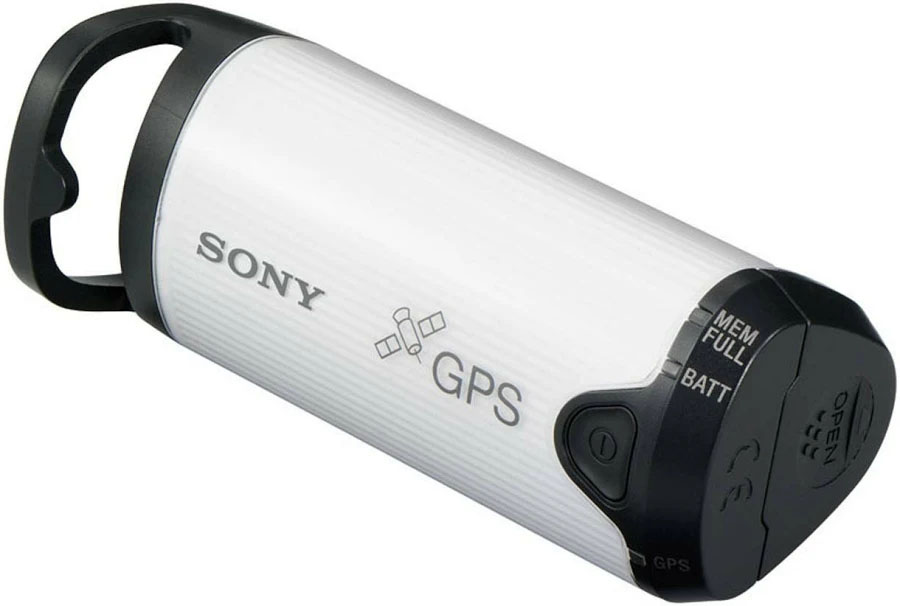
Currently, there are a few small GPS loggers that are similar in function to the Sony unit, and the Sony logger is no longer produced. Search for GPS Data Loggers to find current offerings.
These devices work quite well, if you remember to turn them on and keep them charged. This can be a point of failure.
Cell Phone Apps as Data Loggers
There are a number of Android phone apps, such as Gaia GPS, that provide GPS data logging. These apps store a timeline in a format that can be merged with the photos using a software application.
This is a viable alternative, but it does require that you remember to start and end the app for each day’s shoot. That can be a problem when traveling and there is a lot of stuff happening that’s unrelated to photography.
Android Built-in Location History
The major point of failure of GPS logging systems is a failure to activate them. This is true for hardware GPS units as well as cell-phone based systems. The built-in location logging on Android phones eliminates this failure point. As long as you’ve activated the location logging feature (which many people simply leave on all the time), you get a record of the phone’s locations.
That’s what is used here as it has shown to be a reliable approach that doesn’t require effort when there are other things are demanding attention. And it’s free.
Location Accuracy
Adapting location acquisition and storage to photo geotagging produces imprecise results. This is generally acceptable.
It is possible to use Photo Mechanic’s “Set GPS Coordinates …” function to make small adjustments based on viewing a map. Details of this process are beyond the scope of this discussion. It is sufficient to note that this is a straightforward process that works well in a batch mode.
Programming with Google’s Gemini
This project started with a Gemini question: Can we extract the location data from Google photos without using Takeout to download the images? The answer was “no,” and there was among the output suggestions, the idea that locations are stored in Google’s location history.
Google’s location history feature was changed recently. Instead of storing locations in the cloud, all storage in on a person’s phone. Gemini described how to download a copy of the local location file to Google Drive. From there it was straightforward to move it into the R programming environment.
Now the interesting programming challenges began. The goal was to use the location history file to approximate the places photos were taken. This would be based on matching dates and times of the photos and locations in the history. Seems pretty easy. It wasn’t. Google stores the location history in a nested JSON file using several formats. It depends on whether it is recent data (last 30 days) or older locations.
It took about two days of extensive trial and error to develop a scheme to use the location history to geotag photos. This was a substantial effort on the part of both participants (me and Gemini).
This exercise showed me, again, the value in doing a collaborative programming project. The initial design objectives are a human product. The build out is a combination of human and machine activities. Suggesting design modifications, implemention stress-testing scenarios, performing debugging tests, checking results and many other tasks required a human’s facilitation. On the other hand, rapid code generation, deep analysis of error codes, detailed design implementation and other technical skills were Gemini’s domain.
There were dozens and dozens of iterations. Most steps were a combination of a code revision, file updating for RStudio, rerunning the code, and copying key results for evaluation. Decision points were frequent as the design evolved and alternatives to blocked imprementation pathways were explored.
Future AI collaborations will shift more of the process to the AI engine. This transition is the result of access to more local facilities (e.g., reading local files, running local programs) is being given to AI engines. We’re already seeing the early part of this shift happening.
AI Status Documentation
One of the project’s goals was to document that current state of AI collaboration on a moderately complex personal project.
This project joins a few other R projects in producing packages that would not have been attempted without AI collaboration, particularly in generating R code.
Here are a few observations:
Understanding how to work in RStudioIt is important, likely essential. You must be comfortable moving files, issuing commands in the console, running R code, and a host of other necessary tasks.
Subject-area expertise is necessary. You can learn from the AI engine (indeed, you probably will) but you need a strong core of knowledge and practical experience.
Do the things that humans do best: act on feelings when things don’t seem quite right, issue challenges when things seem incomplete or wrong, and push for and alternative when you suspect there’s a better solution.
Be amazed at the speed at which you can work. This can be breathtaking. Complex or difficult projects can still take quite a while to complete. But incremental additions can be done incredibly fast.
Patience is an important quality. Overall, a project is likely to take longer than expected. Using AI is not a one-shot process. You work your way through problems.
Enjoy discovering that AI knows things that you don’t expect it to know.